
네이버 웹툰 - Naver Webtoon
NAVER WEBTOONComics
4.3760.00 Reviews
- Version
- 2.49.1
- Installs
- 10.00M
- Age Rating
- Teen
Screenshots

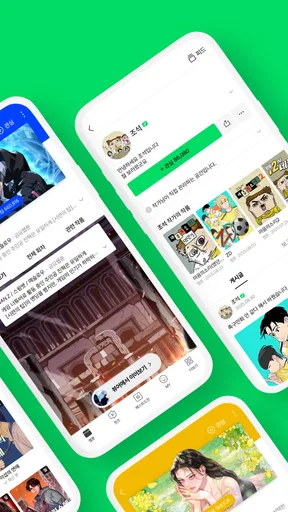
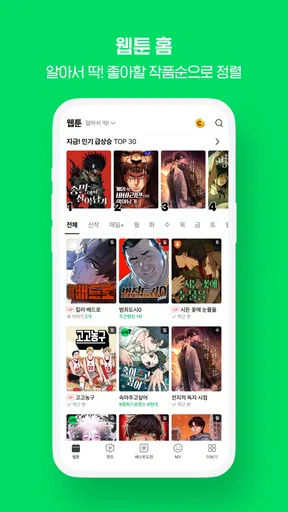
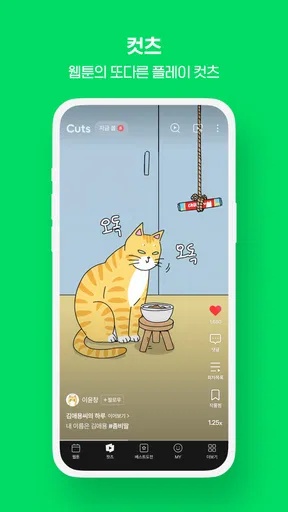

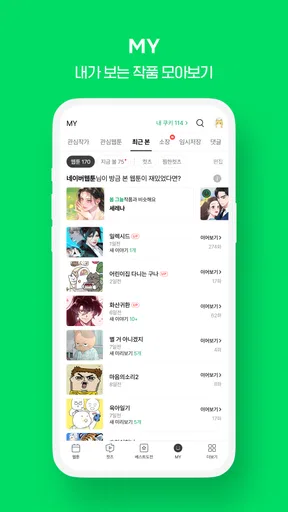
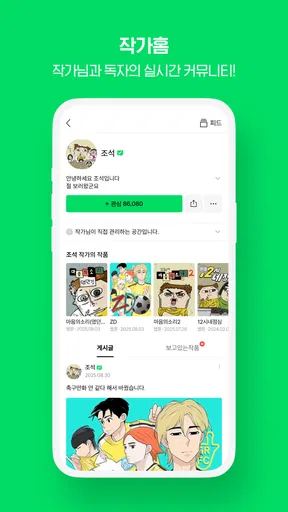
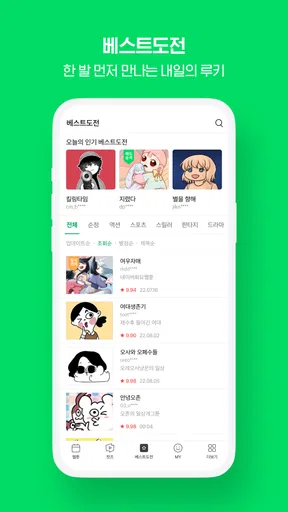
Our Review of 네이버 웹툰 - Naver Webtoon
 Analysis by Appyee
If you’re opening a comics app for the first time, the hardest part is often not finding something to read; it’s choosing a first series without feeling lost in a huge catalogue. I’d approach 네이버 웹툰 as a place to sample stories at your own pace rather than a service you need to master before enjoying. A useful first goal is simple: pick a title whose premise and artwork appeal to you, read an episode, and decide whether its rhythm suits your spare time.
What to expect when you open it
This is a comics-reading app from NAVER WEBTOON, built around webcomics rather than a general ebook shelf. The range of genres makes it easy to switch moods, but a large selection can also make browsing feel less decisive than choosing a single book. I find it helps to begin with the kind of story I want today—something gentle, suspenseful, romantic, or fantastical—instead of trying to identify the “best” series overall.
The app is free to download, and its Teen age rating is a useful starting point for families, though I would still look at an individual comic’s subject and tone before handing it to a younger reader. Its average rating is 4.4 from around 305,000 ratings, and it has more than 10 million installs. Those figures suggest broad interest, but they cannot tell you whether a particular story will be your taste; the first episode is a better test.
A comfortable first session
On your first visit, give yourself a few minutes to browse rather than tapping the first prominent title. Open a series that catches your eye, pay attention to how its panels guide you down the screen, and read enough to see whether the characters and pacing work for you. Webcomics often rely on vertical scrolling, so the experience can feel different from turning pages in a printed comic. I recommend reading at a relaxed pace at first; rushing through the art can make a scene’s timing less effective.
If you already know which genres you enjoy, use that as your filter. If not, sampling a couple of very different series is more informative than starting several similar ones and wondering why they blur together. The artwork is part of the storytelling, not just decoration: panel spacing, color, and changes in composition can shape a joke, a reveal, or a tense pause. Reading on a larger phone screen can make those details easier to appreciate, while a smaller display may encourage shorter sessions.
Making a series fit your routine
The most useful way I’ve found to make a long-running comic manageable is to attach it to a small routine: one episode during a commute, a break, or the end of the day. That gives each chapter room to land and makes it easier to remember where you left off. If you prefer to binge, set a stopping point before you begin; cliffhangers make “just one more” an easy promise to break.
Offline reading can help when you expect to be without a reliable connection. I’d prepare episodes before leaving rather than count on doing it at the last minute, especially if you are about to travel. Downloads also take planning and device storage, so save only the comics you genuinely expect to read away from Wi-Fi and remove them when they are no longer useful. This is a practical trade-off: convenience on a trip in exchange for a little housekeeping.
Understanding free access and paid options
There is plenty to read without paying, which makes it easy to try the app before deciding whether it belongs in your regular rotation. Optional in-app purchases range from $0.10 to $69.99 per item, so I would treat spending as a deliberate choice rather than part of the basic reading routine. If you are tempted to unlock more of a series, first check what is available to read freely and decide whether getting ahead is worth the cost to you. A free experience can still include moments where a reader has to wait or choose whether to pay, so it is sensible to set a personal budget in advance.
One small habit that prevents confusion is to notice whether you are reading for the story itself or browsing because a new episode has caught your attention. The second can turn into a long session without giving you a series you actually want to follow. I’d keep a short mental shortlist, then return to the titles that genuinely held my interest rather than opening every recommendation.
Have you ever found yourself scrolling endlessly through your phone, looking for something new and exciting to dive into? Well, let me introduce you to something that kept me glued to my screen for hours: 네이버 웹툰, or Naver Webtoon. This app is a digital treasure trove for comic enthusiasts and casual readers alike.
Discovering a World of Stories
First things first, what exactly is Naver Webtoon? In simple terms, it’s a platform that offers a wide variety of webcomics from different genres. Think of it as your personal bookshelf filled with everything from romance and drama to horror and fantasy. The app, available on both Android and iOS, is super easy to navigate. It’s like having a comic book store right in your pocket.
The moment you open the app, you're greeted by a clean and intuitive interface. You can start browsing through numerous titles, each with its own unique flavor. Trust me, whether you’re in the mood for something light-hearted or a story with intense twists and turns, Naver Webtoon has got you covered.
Features That Stand Out
Okay, let’s get into some of the features that make this app a must-download. One of my favorite things is the sheer variety of comics available. The library is massive, and new content is added regularly. This keeps the experience fresh and exciting every time you open the app.
- Personalized Recommendations: Once you start reading, the app gets a sense of your preferences and begins suggesting titles that you might enjoy. It’s like having a personal comic curator.
- Offline Reading: Perfect for when you're on the go and don’t have access to Wi-Fi. You can download episodes and enjoy them offline. This feature saved me during a long flight!
- Interactive Community: One cool aspect of Naver Webtoon is the community. Readers can leave comments and interact with each other, discussing plot theories and character developments. It adds a whole new layer to the reading experience.
Immersing in Unique Art Styles
Another thing that stood out to me was the art. Each webtoon boasts a unique style that complements its story beautifully. The vibrant colors and detailed artwork make the stories come alive, and sometimes, I found myself just admiring the art. It's like flipping through a gallery of creativity.
Every artist has a distinct flair, and it’s fascinating to see how they bring their narratives to life. Whether it’s a heartwarming slice-of-life or an action-packed thriller, the visuals are consistently top-notch.
Accessibility and User Experience
Let’s talk a bit about user experience because, honestly, that can make or break an app. Naver Webtoon is available in multiple languages, making it accessible to a global audience. The transition between episodes is smooth, with minimal loading times, which is a huge plus if you're binge-reading a series (guilty!).
The app is free to download and offers plenty of content at no cost. There are optional in-app purchases if you want to unlock episodes ahead of schedule, but it’s not something you’re forced into. You can enjoy a lot without spending a dime.
Choosing it over other ways to read
Compared with reading printed comics, the obvious trade is portability: I can dip into an episode without carrying a book, and the vertical format is designed for phone scrolling. Compared with a general digital comic reader, this feels more like visiting a continuing webcomic destination than organizing a personal library of books I already own. That distinction matters. If you want a broad stream of serialized stories and enjoy discovering artists, this is a natural fit; if you mainly want to manage a purchased collection or read traditional page layouts, a dedicated comic-book reader may suit you better.
It is also not the best choice for every reading situation. Long sessions on a small screen can be tiring, and bright, full-color artwork may not be ideal when you want a quiet, low-distraction reading experience. I would choose a paper comic or an e-reader for extended sessions away from a charger, and use this app for short breaks, travel, or trying a new series. The format is a strength when the story uses scrolling well, but it is still a phone-first way to read.
Small habits that make browsing better
Recommendations can be useful, but I would treat them as suggestions rather than a complete map of the catalogue. If the first few picks do not click, change the genre you browse instead of assuming the whole service is a poor match. A practical approach is to give a new title one episode to establish its voice, then another only if the premise still interests you. That keeps exploration fun without turning every free moment into an obligation to catch up.
Comments add a social layer, particularly when a chapter leaves room for theories or reactions. They can also reveal spoilers, so I avoid opening the discussion until I have finished the episode. If you like reading other people’s interpretations, comments can extend the experience; if you prefer to meet a plot twist without outside hints, simply keep the reading session focused on the comic itself.
For a first-time reader, my ideal test is a normal weekday: choose one appealing series during a short break, read a chapter, and notice whether you want to return to it later. If you do, make it part of a routine rather than subscribing yourself to a dozen stories at once. If you do not, try a different genre or art style. The point is to find a reading rhythm that feels enjoyable, not to finish a catalogue.
Who will get the most from it
I’d recommend this app to people who like serialized storytelling, want to discover a range of webcomics, and are comfortable reading on a phone. Casual readers can enjoy it in small doses, while dedicated comic fans may appreciate having many distinct art styles and ongoing stories in one place. Its Teen rating gives a broad age cue, but parents should still judge a particular series for themselves, since genre labels alone do not explain every story’s themes.
I would steer away from it if you strongly prefer paper, dislike vertical scrolling, or want every episode of every story immediately available without any waiting or spending decisions. It is also less compelling if you already have a specific, finite comic collection in mind and do not want recommendations or community discussion. Knowing that before installing saves frustration: this app’s appeal is discovery and serial reading, not simply reproducing a shelf of print volumes on a screen.
Version, value, and a sensible first step
The app has been around since December 21, 2010, and its current version is 2.40.0, with Android 7.0 as the minimum operating system. That makes compatibility worth checking before you plan to use it on an older device. I would also remember that the free download and optional purchases are separate decisions: you can start by reading without paying, then decide later whether any paid unlock is worthwhile for your habits.
My straightforward first step is to install it, pick one story based on its premise and artwork, and read at a time when you can give the panels your attention. If it works for you, save the title mentally or return to it through the app’s browsing flow, and keep the next session modest. That is a more reliable way to find a favorite than trying to evaluate the entire catalogue on day one.
Final Thoughts
In conclusion, Naver Webtoon is a fantastic app for anyone who loves comics or just wants to explore new stories. With its vast library, stunning art, and user-friendly interface, it’s no wonder it’s a favorite among many. So, if you haven’t already, give it a try. You might just find your next obsession!
Ready to dive into the world of Naver Webtoon? Go ahead, download the app, and let your imagination run wild.
Privacy and Permissions
See what permissions an app requests and how it handles your data.
- Identity
- add or remove accounts
- Photos/Media/Files
- read the contents of your USB storage, modify or delete the contents of your USB storage
- Storage
- read the contents of your USB storage, modify or delete the contents of your USB storage
- Camera
- take pictures and videos
- Microphone
- record audio
- Wi-Fi connection information
- view Wi-Fi connections
- Other
- view network connections, create accounts and set passwords, change network connectivity, full network access, run at startup, reorder running apps, draw over other apps, use accounts on the device, control vibration, prevent device from sleeping
Verdict
Strengths of 네이버 웹툰 - Naver Webtoon
- Vast library of diverse webtoons.
- Frequent updates keep content fresh.
- User-friendly interface for easy navigation.
- Offline reading mode available.
- Interactive comment sections for engagement.
Limitations of 네이버 웹툰 - Naver Webtoon
- Limited language options for non-Korean readers.
- In-app ads can disrupt reading experience.
- Some content requires in-app purchases.
- Occasional loading issues or lag.
- Notifications can be overwhelming if not managed.
Other Releases by NAVER WEBTOON
View All
WEBTOON: Manga, Comics, Manhwa
Comics4.6

SERIES
Books & Reference4.4
Similar Picks in This Category
View AllWEBTOON: Manga, Comics, Manhwa
NAVER WEBTOON4.6

MangaToon: Comic & Manga
MangaToon4.3

Tapas – Comics and Novels
Tapas Entertainment Inc.4.2

Lezhin Comics - Daily Releases
LEZHIN ENTERTAINMENT3.3

WebComics - Webtoon & Manga
WEBCOMICS HOLDINGS HK LIMITED4.4

MANGA Plus by SHUEISHA
株式会社 集英社3.6
Frequently Asked Questions
What content does Naver Webtoon offer?
Naver Webtoon provides a wide variety of webtoons across multiple genres, including drama, romance, fantasy, and action. With thousands of titles available, users can explore stories from both popular and emerging creators. The platform updates regularly, ensuring fresh content for readers to enjoy daily.
Is Naver Webtoon free to use?
Yes, Naver Webtoon is free to download and use. While most of the content is accessible for free, some titles may offer in-app purchases for fast passes or coins that allow early access to episodes or exclusive content. This freemium model keeps the main experience accessible to all users.
How often are new episodes released?
New episodes on Naver Webtoon are typically released on a weekly basis, depending on the webtoon. Each series follows its own schedule, which is often listed within the app, allowing readers to anticipate new releases. This regular update model keeps the audience engaged and excited for upcoming content.
Can I download episodes for offline reading?
Yes, Naver Webtoon allows users to download episodes for offline reading. This feature is especially useful for those who want to enjoy their favorite webtoons without an internet connection. By downloading episodes, users can read on the go, whether they're commuting or traveling.
Is Naver Webtoon available in multiple languages?
Naver Webtoon is available in multiple languages, including English, Korean, and several others. This multilingual support helps cater to a global audience, making it easy for users from different regions to access and enjoy the diverse range of content offered by the platform.
